.png)
How to Use Journey Builders to Automate Conversations Across Channels
Explore how journey builders work across SMS, WhatsApp, voice, and email. Learn key features, use cases, and how to automate conversations in regulated industries.
Most businesses have embraced some form of automation such as email drips, CRM workflows, or chatbot responses. But when it comes to coordinating timely, contextual, and compliant conversations across SMS, WhatsApp, voice, and email, traditional tools often fall short.
Journey Builders solve this problem.
They automate customer engagement across multiple channels using triggers, rules, and real-time data.
In this guide, we’ll explain what journey builders really are (and aren’t), explore their key components, and compare popular solutions with CRM-native alternatives. Whether you’re in education, healthcare, finance, or customer service, you’ll learn how to automate multi-step, cross-channel journeys that are not just efficient but also compliant and conversion-friendly.
What is a Journey Builder?
A Journey Builder is a platform that lets you design and automate conversations across channels using data and logic to control how each interaction unfolds. Instead of relying on static campaigns or fixed schedules, it builds conditional paths based on real-time triggers, customer behavior, and business rules.
Teams can use journey builders to onboard a student, qualify a loan applicant, or follow up with a patient. They can guide the entire process, step by step across SMS, WhatsApp, voice, email, and more.
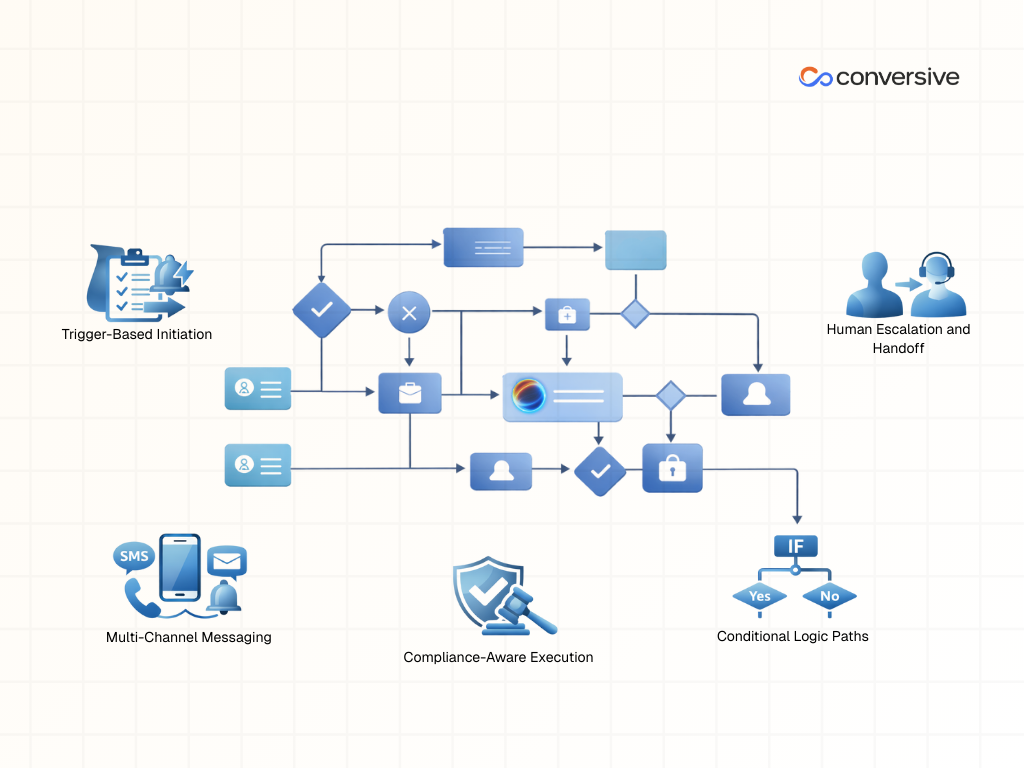
What sets a Journey Builder apart from a basic automation studio or campaign scheduler are 5 capabilities that support both flexibility and accountability:
Capability #1. Trigger-Based Initiation
Journeys start from real-time events like a new CRM record, a missed call, a form submission, or an API call from another system. This ensures the conversation begins when the user actually does something, not on a fixed calendar.
Capability #2. Multi-Channel Messaging
Messages can be sent through SMS, WhatsApp, voice calls, email, or push notification depending on the user’s preferences, the urgency, or the regulatory requirement.
Capability #3. Conditional Logic Paths
You can define “if this, then that” logic at every step branching the conversation based on how users respond, how quickly they reply, or what status their CRM record reflects.
Capability #4. Human Escalation and Handoff
If a conversation requires a live agent such as a legal intake or medical consultation, the platform can automatically route it to the right person, carrying forward the full conversation history for context.
Capability #5. Compliance-Aware Execution
Many Journey Builders also support consent tracking, audit logs, and rule-based messaging windows to ensure communication stays within regulatory bounds, especially critical in sectors like healthcare, finance, and education.
Key Components of A Journey Builder
Every Journey Builder operates on the same foundational model: start with a trigger, guide users through steps using logic and messaging, and end with a resolution or handoff. To do this well, platforms must include a few non-negotiable components regardless of industry or use case.
Below, we break down the four critical modules that power any robust Journey Builder platform.
Component #1. Entry Sources and Triggers
A journey always starts with a defined entry point. These triggers tell the system when to begin and who the journey applies to.
- A CRM record change such as a lead being created, a case being escalated, or a status field being updated can automatically trigger a journey.
- External systems can initiate a journey via API, for instance, when a new form is submitted on a website or a transaction occurs in a third-party app.
- Interactive actions like QR code scans or clicks on embedded WhatsApp or SMS buttons can launch user-specific flows.
- A scheduled event such as an upcoming appointment or deadline can also serve as a starting point for a reminder or engagement sequence.
Component #2. Messaging Modules
Once a journey is triggered, the platform needs to communicate effectively across channels. Messaging modules control what gets sent, how, and when.
- Platforms should support multiple outbound channels, including SMS, WhatsApp, voice calls, email, and mobile push notifications.
- Message content should be templated with support for dynamic personalization, allowing each message to include data from CRM fields like first name, appointment date, or program of interest.
- Each module should include configurable options for language selection, message timing (e.g., avoid weekends), retry attempts, and fallback channels if the primary one fails.
Component #3. Flow Controls and Logic Paths
User journeys rarely follow a straight line. Flow controls introduce logic that lets the system adapt based on behavior, timing, and status.
- Decision splits can route users down different paths depending on whether they responded, clicked a link, or meet specific criteria in the CRM such as being marked “high priority.”
- Wait steps allow the journey to pause for a set period (e.g., 2 hours, 3 days) before continuing, helping to space out communications or await user input.
- Goal-based exits let the journey end automatically when a user completes the desired action like submitting a form or confirming an appointment.
Component #4. Human Handoff and Escalations
Not every interaction can be resolved through automation. Journey Builders must include a way to route cases to human agents when complexity or urgency demands it.
- The system should automatically escalate conversations to live agents based on defined rules, such as no response within a certain timeframe, a negative sentiment, or a high-risk category.
- Escalated cases must carry the full conversation history, ensuring the agent has complete context without needing to ask the user to repeat themselves.
- Handoffs can be prioritized and routed based on agent availability, skillset, or queue assignment, especially in contact center environments.
When to Use a Journey Builder vs. Automation Studio or Standalone Campaign Tools
Not all automation needs require a full Journey Builder. In some cases, lightweight tools like email drip schedulers, alert systems, or form responders are more efficient and easier to manage.
Journey Builders shine when conversations span multiple steps, channels, or decision points. They’re built for situations where timing, behavior, and compliance all influence how a message should be sent. On the other hand, if you’re sending a one-time alert or running a simple nurture campaign, an automation studio or campaign tool might be all you need.
Choose a Journey Builder if
- You’re managing multi-step interactions that span multiple touchpoints, such as onboarding flows or lead nurturing across SMS and WhatsApp.
- You need to trigger messages from CRM events like a case update, lead status change, or API integration with another system.
- Your flow requires escalation logic or live agent handoff, such as routing unresponsive leads to your sales team after 24 hours.
- You operate in a regulated industry where compliance (e.g., opt-ins, audit logs, 10DLC rules) is non-negotiable and must be built into the workflow.
Choose Lightweight Tools if
- You're sending one-off transactional messages, such as appointment confirmations or delivery alerts.
- Your campaign is email-only and doesn’t require branching logic or multi-channel engagement.
- You don’t need conditional logic, escalation, or CRM-linked behavior to drive the messaging path.
Here’s a quick scenario-based comparison to help you choose between journey builder and other tools:-
How to Build a Multi-Channel Journey with Conversive
Conversive offers a Journey Builder experience that’s both configurable and compliance-aware. Unlike generic tools, Conversive doesn’t just send messages; it integrates deeply with your CRM records, tracks engagement, and adapts in real time.
Let’s walk through how a multi-channel journey can be created using Conversive’s no-code builder:
Step 1: Set the Trigger in Salesforce (e.g., lead created)
Start by defining what event should launch the journey. In Conversive, you can map this to any Salesforce record change like when a new lead is created, or a lead status moves to "Interested." This ensures the journey begins as soon as a qualifying action occurs.
Step 2: Choose the Channels (WhatsApp + Voice)
Next, select which channels the journey should use. Conversive supports SMS, WhatsApp, Voice, Email, and even push notifications allowing you to sequence them based on urgency or consent. For high-priority leads, the journey might begin on WhatsApp and escalate to a voice call if no response is received within a defined window.
Step 3: Add Branching Logic Based on Response Time
You can insert decision splits to monitor if and when a user responds. For example, if a user replies within 30 minutes, the flow continues with a follow-up message. If they don’t respond, the journey pauses, then branches to an escalation path, perhaps a voice reminder or a live agent handoff.
Step 4: Insert Live Agent Handoff for Unresponsive Prospects
Conversive allows seamless handoff to live agents using Converse Desk or Inbox. When a threshold is met (e.g., no response after two touches), the system routes the conversation to an available agent along with the full history enabling context-aware follow-up without repetition or data loss.
Step 5: Define Goals and Track Engagement Metrics
Every journey in Conversive can have defined goals, such as form submission, appointment confirmation, or qualification. The platform logs every message, click, opt-in, and handoff, feeding real-time metrics back into Salesforce dashboards for campaign optimization and compliance tracking.
Common Journey Builder Use Cases in Regulated and High-Touch Industries
In regulated and service-heavy sectors like education, healthcare, legal, and finance, customer interactions are rarely simple. Each journey often involves multiple steps, varied channels, and strict compliance requirements. Journey Builders provide the infrastructure to automate these workflows while maintaining the flexibility and oversight needed for sensitive, time-critical communication.
Below are examples of how different industries use journey builders to manage complex engagement flows:-
i) Education
Education institutions use journey builders to manage high volumes of prospective student inquiries. A journey might begin when a student submits a contact form, triggering a WhatsApp message with program information. If the student doesn’t respond within a day, an SMS reminder goes out. Branching logic can personalize follow-ups based on program of interest, response time, or document status. These journeys reduce drop-offs and ensure timely reminders ahead of application deadlines.
ii) Healthcare
In healthcare, appointment scheduling journeys often start with a reminder message sent a few days in advance. If the patient confirms, the system may follow up with a checklist or instructions via email. If the patient does not respond, the journey can escalate to a voice call or front-desk notification. Additional branches may handle post-visit feedback, prescription notifications, or rebooking missed appointments. Every message must be sent within compliance boundaries such as HIPAA and TCPA.
iii) Legal
Law firms and legal services use journey builders to streamline intake processes and manage document collection. A journey may be triggered when a new lead submits an online case inquiry. The system sends a series of messages guiding the client to upload necessary documents, with conditional paths if a file is missing or the client hasn't responded within a set timeframe. Escalations can route the case to a paralegal for manual follow-up. Every interaction is timestamped for traceability.
iv) Finance
Financial institutions use journey builders to guide customers through the loan qualification process. A typical flow starts when an application is submitted triggering a multi-channel sequence that requests documents, verifies details, and confirms milestones. Delays or incomplete responses can trigger reminders or escalate to a human agent. Journeys often include built-in checks for consent and identity verification, ensuring communication stays compliant with financial regulations.
Compliance Considerations for Journey Builders
Automation without built-in safeguards can lead to unintentional violations of telecom, privacy, or industry-specific regulations.
Some platforms treat compliance as a feature you configure, rather than a foundation baked into every message. This can leave teams exposed to legal risk, especially when operating across channels like SMS, WhatsApp, or voice in industries governed by HIPAA, GDPR, or TCPA.
Key areas often overlooked include how opt-ins are collected, how message logs are stored, and whether escalation flows respect privacy boundaries. If your use case involves personal data or sensitive timing (e.g., healthcare reminders or legal updates), compliance isn’t optional, it’s structural.
Here’s a quick checklist to verify if your Journey Builder is compliant:-
- Opt-in is tracked by channel (e.g., SMS vs. WhatsApp) and tied to user identity.
- Audit logs exist for every message sent, with timestamps, content, and delivery status.
- Double opt-in and keyword-based unsubscribe flows are available and enforced by default.
- The platform supports channel-specific policies, such as WhatsApp’s 24-hour response window.
- HIPAA or GDPR-ready architecture is in place, with region-based data storage and access controls.
- Escalation flows include guardrails to prevent exposing sensitive information during live agent handoff.
- Consent records are centralized and accessible from the CRM or case management system.
Why Choose Conversive for Journey Builder?
Most journey builders were designed as bolt-ons built for campaign automation. Conversive is a CRM-native journey orchestration platform purpose-built for healthcare, education, legal, and financial services. Every conversation, trigger, and escalation is rooted in real-time data and designed with compliance in mind.
Conversive is built to manage the end-to-end customer journey from inquiry to resolution across SMS, WhatsApp, voice, and email. Because it’s embedded in Salesforce, every action syncs with your existing workflows, records, and dashboards. No need for custom integrations or context switching.
Here’s what makes Conversive different:-
i) Real-Time CRM Orchestration
Conversive triggers journeys directly from Salesforce record changes whether it's a lead, opportunity, or case update. Flows can respond in real time and personalize messaging based on record data.
ii) Multi-Channel by Design
Unlike many platforms that specialize in a single channel, Conversive supports SMS, WhatsApp, Voice, and Email natively, so you can mix and match based on urgency, compliance, or user preference.
iii) Compliance Built-In
Conversive enforces regulatory controls like 10DLC registration, opt-in tracking, audit logs, HIPAA safeguards, and WhatsApp compliance (e.g., 24-hour window). These aren't optional add-ons, they're core to the platform.
iv) Human-AI Collaboration
Journeys can include intelligent agent handoffs through Converse Desk or Inbox, where human agents can step in with full context and historical visibility.
v) Industry-Tuned Templates
Conversive includes ready-to-deploy workflows for education, healthcare, finance, and legal making it faster to launch without starting from scratch.
Book a Demo to experience how Conversive orchestrates compliant, multi‑channel customer journeys directly inside your CRM.
Frequently Asked Questions
What is the difference between a journey builder and a campaign scheduler?
A campaign scheduler typically sends messages on a fixed timeline like a weekly email blast without adjusting to user behavior. A journey builder, on the other hand, responds to real-time triggers and includes logic for branching, escalation, and goal tracking. It’s built to manage interactions, not just dispatch content.
Can journey builders handle WhatsApp and Voice automation?
Yes, but not all platforms support both. Advanced journey builders allow you to mix channels starting a conversation on WhatsApp, then following up with a voice call if needed. This flexibility is key in service-driven industries where urgency and reach matter.
How do journey builders ensure compliance with 10DLC or HIPAA?
Compliance features vary by platform. A compliant journey builder should support opt-in tracking by channel, enforce 10DLC registration rules, include audit logs for each message, and offer safeguards for protected health or financial data. Without these, you risk violating regulations.
Are journey builders only for marketing use cases?
No. Journey builders are increasingly used for service automation, lead qualification, appointment management, intake processes, and customer support. They’re especially valuable in industries where timing, personalization, and compliance are just as important as engagement.
What’s the easiest way to start building journeys without coding?
Look for platforms with drag-and-drop interfaces and native CRM integration. These tools let you set up triggers, messages, and logic paths visually without writing code. Some also offer pre-built templates tailored to specific industries or workflows.


.png)

Explore More
.png)